We use cookies to run JobLine and measure performance. We don't sell your data, and marketing cookies stay off unless you turn them on. See the Cookie Policy and Privacy Policy.
Manufacturing doesn't lose parts.It loses information.
- Second shift ran it again, because nobody wrote down it was already done.
- The customer called about a job and three people gave three answers.
- The same burr showed up on the same part — for the third time this year.
JobLine keeps what your crew knows moving from shift to shift and job to job — and we help you set it up on your floor.
Or start free for 14 days — no card needed.
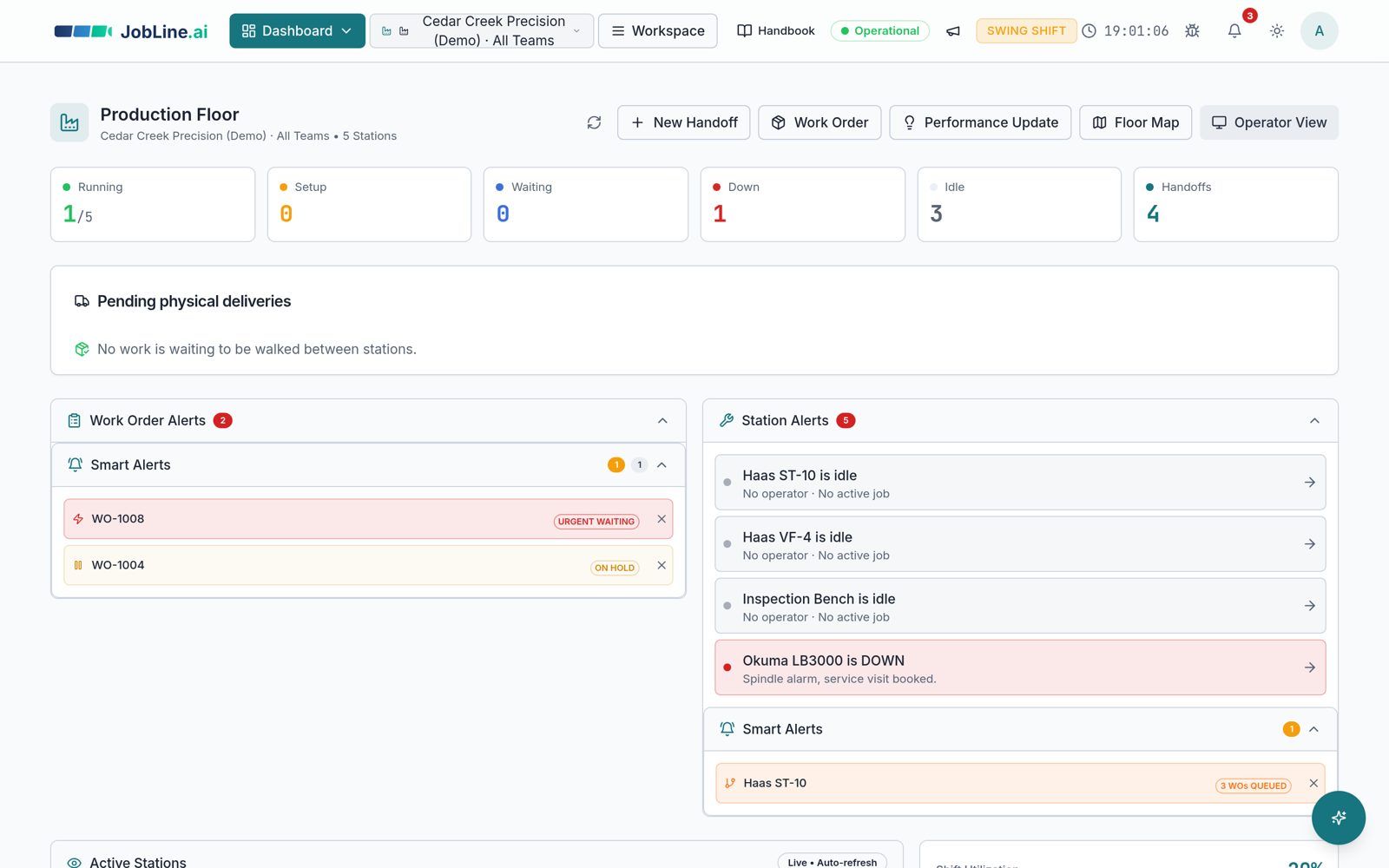
Fix the problems you already have
No rip-and-replace. Keep your ERP and your travelers — JobLine covers the gaps between people, shifts and steps.
Shift handoffs that survive the shift change
Machine status, alarm codes, do-not-run notes and material lots — written once at the machine, read by the next crew.
One queue everyone trusts
Every work order, station and hold in one place. Urgent jobs that haven't started and stations with too much queued get flagged.
Repeat issues caught before the first cut
Operator notes are grouped by part number, so a known problem shows up when that part is back on the floor.
A planning assistant that knows your floor
Ask what to run next, what is at risk, or what to move when a machine goes down — answered from your live queue, not a guess.
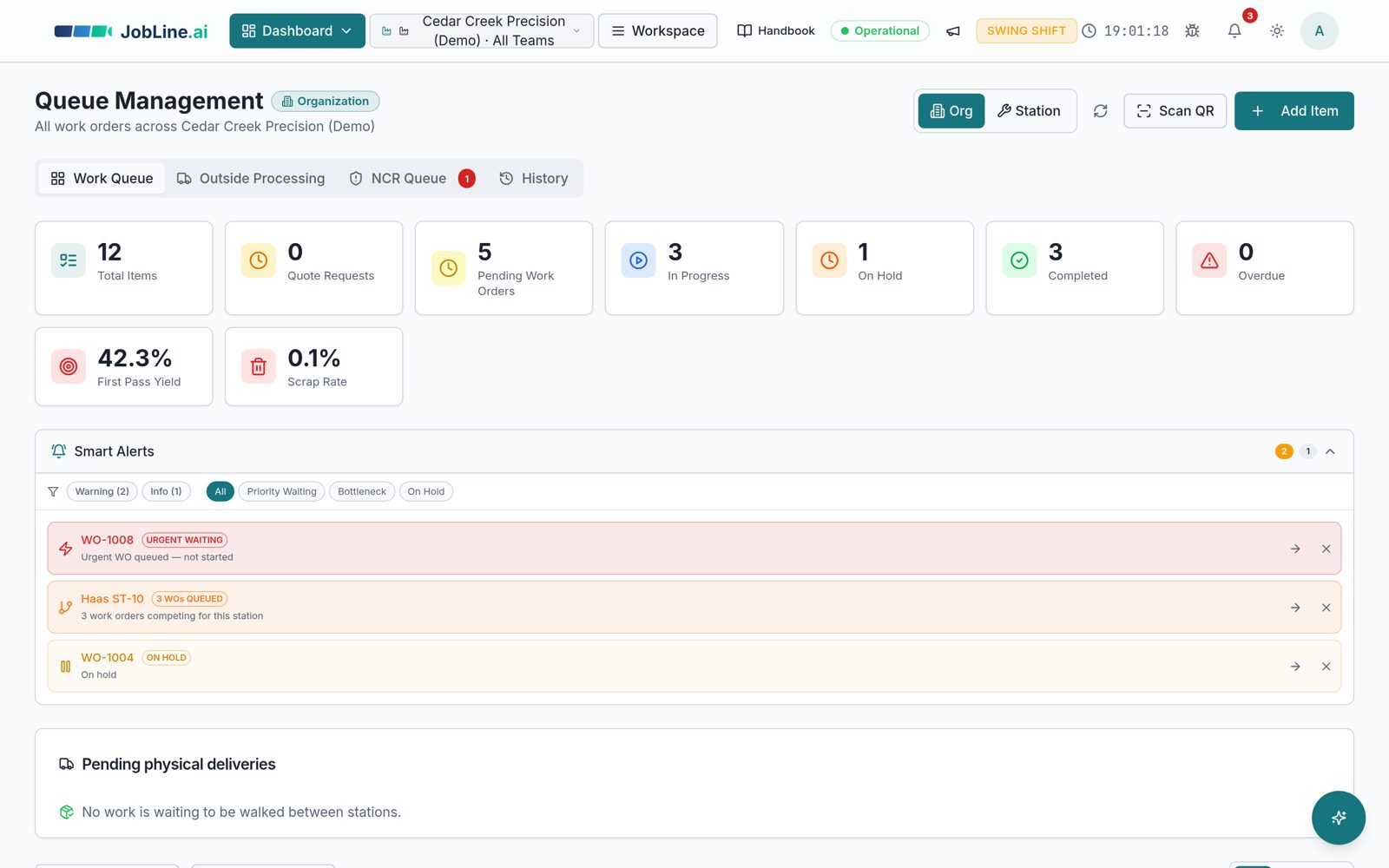
Know what's stuck before anyone asks
An urgent job nobody has started. Three work orders fighting for the same lathe. A job on hold since Tuesday. JobLine puts them at the top of the screen instead of at the bottom of someone's memory.
“Do NOT power cycle before Maintenance inspects the spindle. Program paused at N0812.”
The note the night crew needs — attached to the machine, not to a whiteboard.
From a shift note to a better next run
See the same chip problem move from a handoff note to a planning heads-up and a proposed setup improvement.
Real JobLine screens in light mode. Fictional demo shop records, not customer results.
Planning Assistant: see the risk and the next check
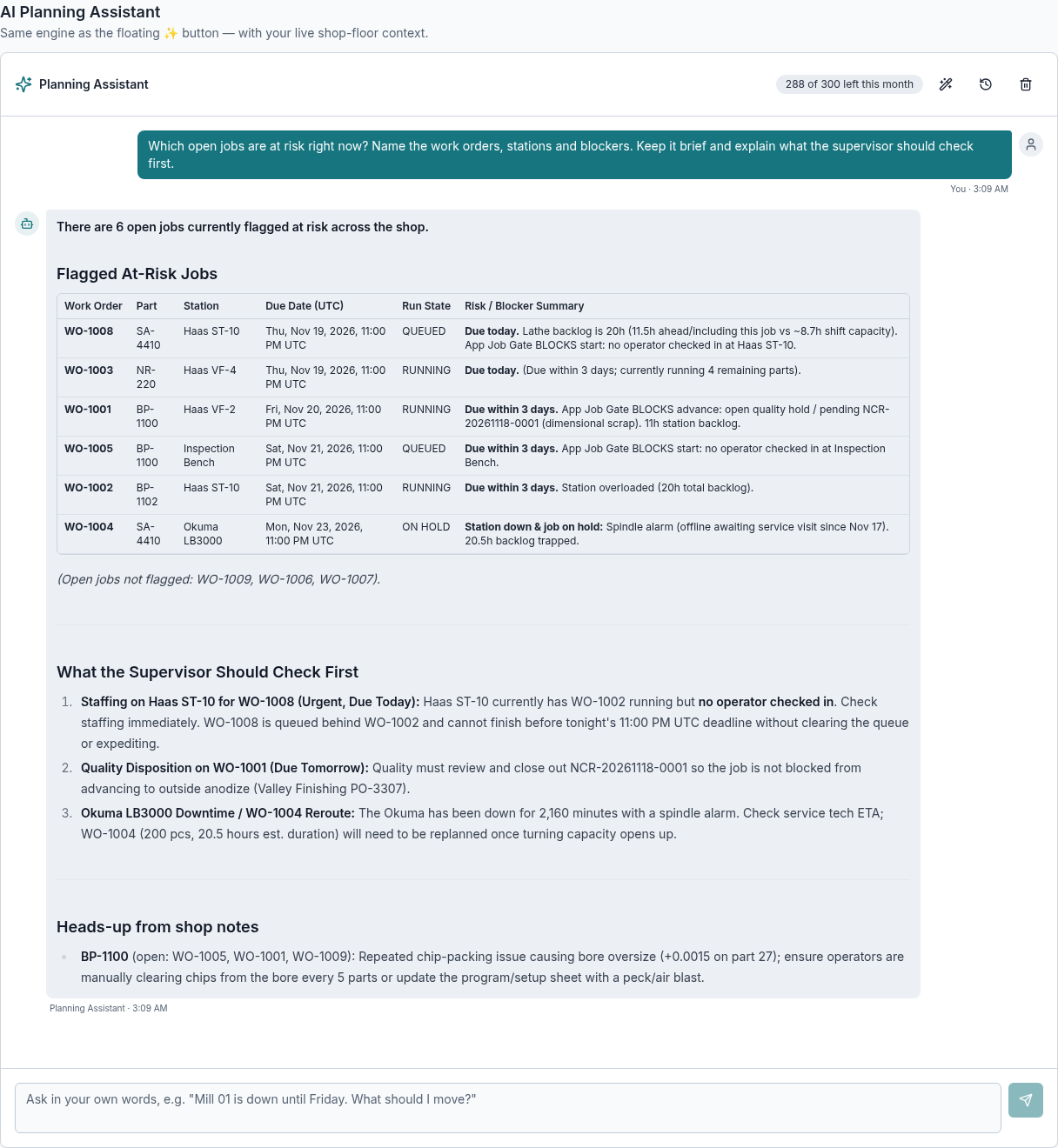
A supervisor asks which jobs are at risk. The answer names the work orders, staffing gaps and quality holds — then flags a repeated chip problem from operator notes.
Active charts: see what the shift produced
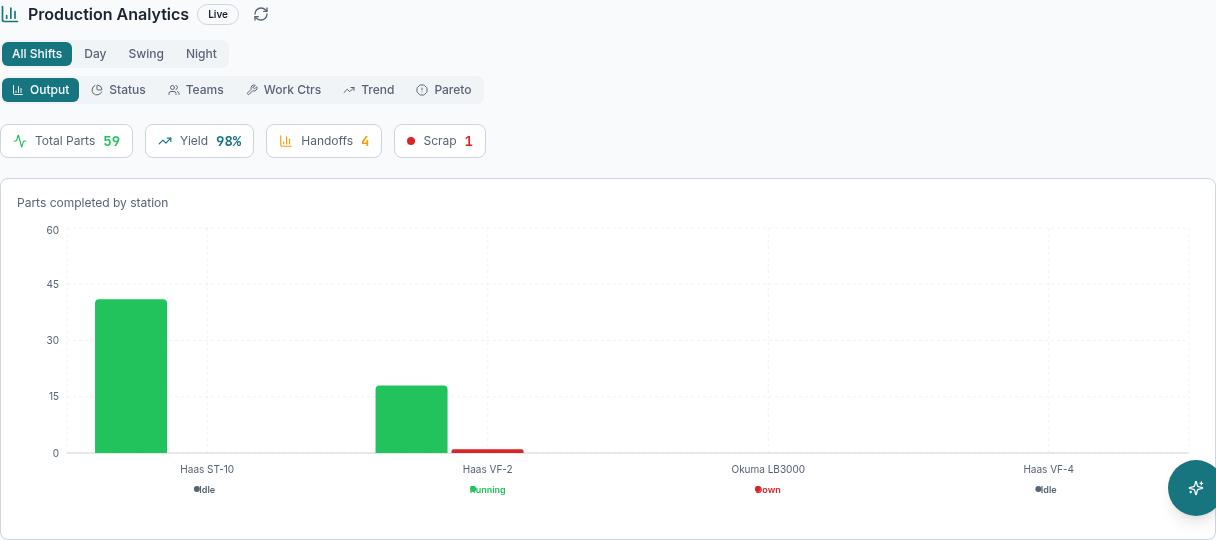
Compare completed parts by station alongside yield, scrap and handoff counts. Shift filters and output, status, trend and Pareto views keep the conversation grounded in recorded work.
Handoff notes: the next crew gets the details
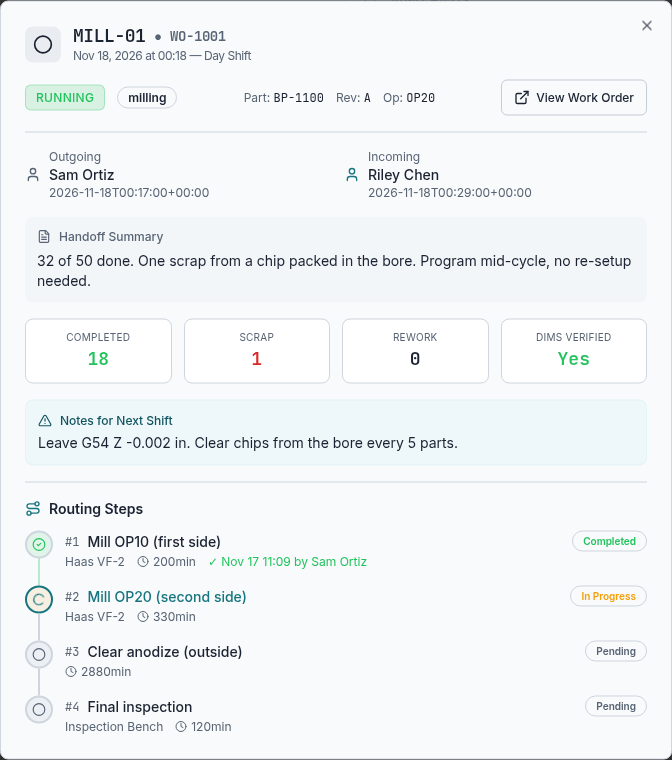
The outgoing operator records a chip-packed bore, the current offset and a chip-clear check every five parts. Those details stay beside the job and its routing steps.
CIA: turn shop-floor knowledge into an improvement
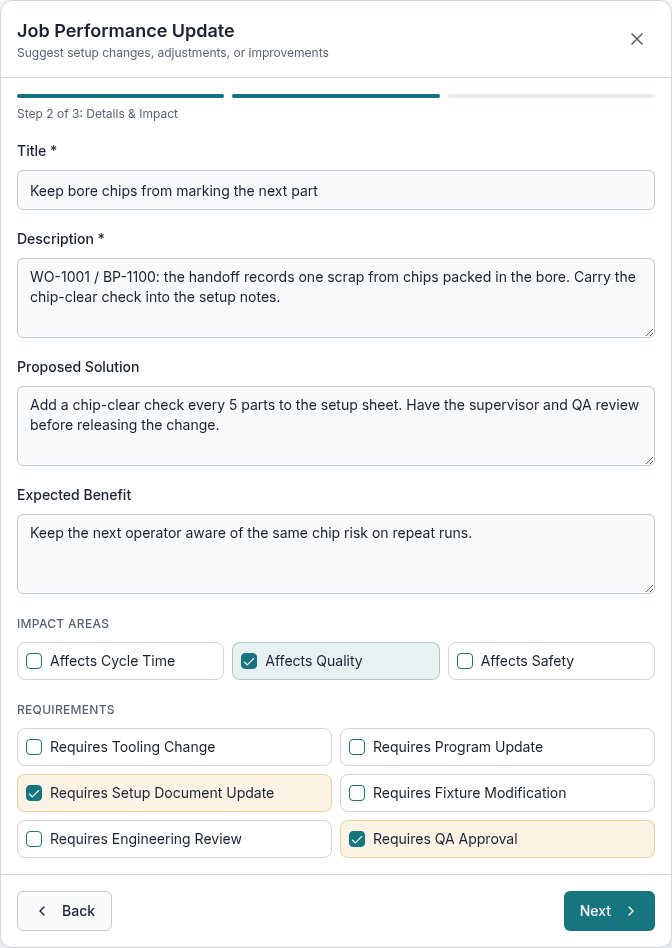
Continuous improvement starts with the observation, proposed solution and expected benefit. Capture quality impact and the need for setup-document updates and QA approval before a change is released.
Set up in your facility, with you
You run a shop, not an IT department. We do the setup work alongside you so your crew uses it from day one.
- 1
30-minute call
We look at how jobs move through your shop today and pick the one problem worth fixing first.
- 2
We set up your shop
Machines, stations, routing and your crew's logins — built with you, using your real part numbers.
- 3
One machine, two weeks
Start with one work center and one crew. We check in during the first week and adjust.
- 4
Roll out when it earns it
If it catches something real, add the rest of the floor. If it doesn't, you've lost nothing.
Four people, one source of truth
Write it once, at the machine, in under two minutes.
See every station's last handoff in one list instead of walking the floor asking.
Know which jobs are blocked and why before the morning meeting.
Traceability that holds up in an audit, without a step your crew will skip.
Priced per shop, not per seat
Team is $149/month for 10 people — about $14.9 each, and less than two hours of spindle time.
- Full dashboard access
- Unlimited handoff submissions
- Performance update tracking
- Real-time station monitoring
- Email notifications
- Mobile-friendly interface
- Everything in Single User
- Up to 10 users included
- Team management dashboard
- Shared station assignments
- Team analytics & reports
- Priority email support
- Everything in Team
- 10 seats included, $12/seat/mo after
- Admin control panel
- Custom integrations
- Dedicated account manager
- SSO & advanced security
- API access
- ERP Connector integration
14-day trial, no card. Optional hands-on concierge setup is $1,500. Cancel any time.
Not ready to talk? Start with our free paper handoff template.
Free Shift Handoff Template
The one-page handoff your next shift will actually read. Excel + printable PDF.
Enter your work email to receive the free shift-handoff template. It is free, with no purchase, trial or card required. We use your address to send the file and to answer you. See our Privacy Notice.
See it on your own jobs
Bring a real part number. In 30 minutes we'll show you how it would move through your shop — and what it takes to set up.
- Walkthrough on a shop like yours
- Setup plan for your machines and crew
- Straight answers on price
Prefer email? Write to hello@jobline.ai — or start free